
QVideo8 launches

Free beta is open, Nov 9–23.

Join the QVideo8 beta in 3 steps (Mac)

  1. 1

    Get TestFlight

    Install Apple's free TestFlight app from the Mac App Store.

  2. 2

    Open the invite

    On your Mac, click Join the QVideo8 beta, then click Accept.

  3. 3

    Install and play

    Click Install in TestFlight, and QVideo8 lands in your Applications folder.

Free beta, runs Nov 9–23. Requires a Mac and an Apple ID.

Launches January 12, 2027

January 12, 2027, 12:00 AM Mountain Time

QVideo8: Record the music.
Record the performance.
At the same time.

The Founding 100: claim your plaque in QVideo8 history.

QVideo8 is a professional multitrack video digital audio workstation for serious musicians. Your mics, your interface, and a real multitrack mix, with 10 tracks recorded, up to 8 on screen. Each track is filmed at the same moment you record it, in the same take. The camera captures the actual performance behind every track, so it's seen as well as heard. For one-man bands, musicians on screen, and DJs and performers who record and film their sets in the studio, or wherever creativity inspires you. Make something worth remembering.

Apple silicon · macOS 15 Sequoia or later · Free, or Pro at $39.99 a year or $99.99 lifetime

Join the QVideo8 beta in 3 steps (Mac)

  1. 1

    Get TestFlight

    Install Apple's free TestFlight app from the Mac App Store.

  2. 2

    Open the invite

    On your Mac, click Join the QVideo8 beta, then click Accept.

  3. 3

    Install and play

    Click Install in TestFlight, and QVideo8 lands in your Applications folder.

Free beta, runs Nov 9–23. Requires a Mac and an Apple ID.

In the Works

See what's coming next

Cannonball 10x and Beyond, a game from the world of QuantumRecall.tv, is in development at the lab. The show is published on Apple TV and Roku, with Fire TV coming .

See what's in the works →
Cannonball 10x and Beyond poster art: the Dream Team racing down a runway. Coming in 2027.
QuantumRecall.tv Roku app home screen
Roku app · Published

For the one-man band, the musician on screen, and DJs filming a set in the studio, or wherever creativity inspires you.

Your phone makes clips. Your studio makes records. Play every instrument yourself, or showcase a performance professionally so you're seen as well as heard. DJs and performers record and film their sets as they play them, in the studio, or wherever creativity inspires you. Your mics, your interface, and a real multitrack mix, with 10 tracks recorded, up to 8 on screen, each filmed at the same moment you record it, in one split-screen video on your Mac.

How it works

Five steps from the first mic take to a performance worth remembering.

Sound and picture in the same take. The full walkthrough is in the user guide.

  1. 01

    Record a track

    Your mic and the camera, together on that take. Locked in sync.

  2. 02

    Layer the next part

    10 tracks recorded, up to 8 on screen, with click and count-in to keep you tight.

  3. 03

    Direct the video

    One camera, split screens, or grids up to eight panels.

  4. 04

    Mix it

    Faders, pan, mute, solo, and automation, with effects on every track.

  5. 05

    Export

    Mix down to a video file in 16:9 or 9:16, or audio only, from In to Out.

Made in QVideo8

Performances worth remembering.

Split-screen music videos made in QVideo8 — one-man bands, players seen as well as heard, and DJs filming a set in the studio, or wherever creativity inspires you.

“Winning That Matters” — Paul Saurini’s own song, performed and recorded in QVideo8. Each part was filmed while its audio was recorded, in the same take. 10 tracks recorded, up to 8 on screen. This cut includes cinematic b-roll clips. Cinematic b-roll scenes are AI generated, but the performances are all real.
“Winning That Matters” — vertical cut for phones, with cinematic b-roll. Cinematic b-roll scenes are AI generated, but the performances are all real.
“Winning That Matters” — performance mix. Purposely performance-focused: just the live panels and the performance, no b-roll. Every part was filmed while its audio was recorded, in the same take.
Your performance could be next. Made something great in QVideo8? Send it in, and strong performances get featured here. Submit your video

Features

A professional audio studio that films each track as you record it.

10 tracks recorded, up to 8 on screen. Your mics, your interface, and a real multitrack mix. Each track's video is filmed in the same take as its audio.

Your iPhone is a wireless camera.

Use your iPhone as a wireless camera via Continuity Camera, along with the Mac's camera or a USB webcam. The picture is filmed at the same moment you record that track's audio.

01 Recording
Ten tracks. Sound and picture in the same take.

  • 10 tracks recorded, up to 8 on screen. Each track has its own audio and, if you like, its own camera, filmed at the same moment you record it.
  • Any audio interface or USB mixer, any input on any track. Mono or stereo. A stereo track can take any two inputs, and a warning appears when those two inputs carry the same sound.
  • Record Ready: arm the transport once, then Space records a take and Space stops it. Undo a take and the playhead goes back to the start.
  • Live meters and a live waveform as you record. Count-in and click, with their own volume and sounds, heard only by you, never recorded. A warning appears if the click plays through speakers into the mic.
  • Hear Input: hear yourself through headphones while you record. Tempo with a lock, Tap tempo, and time-signature changes. Each take remembers the tempo it was recorded at.
  • Cameras: the Mac's camera, USB webcams, or an iPhone as a wireless camera via Continuity Camera. Each take's video lines up with its audio. Auto-save, and nothing is lost if the Mac quits mid-take.
  • Video records at up to 1080p, 30 fps. Each camera records its largest picture up to 1920 pixels on the long side, so a 4K webcam records at 1080p, locked at 30 frames per second so it never slows down in dim light. For 9:16, an iPhone can record a taller 1920×1440 picture.
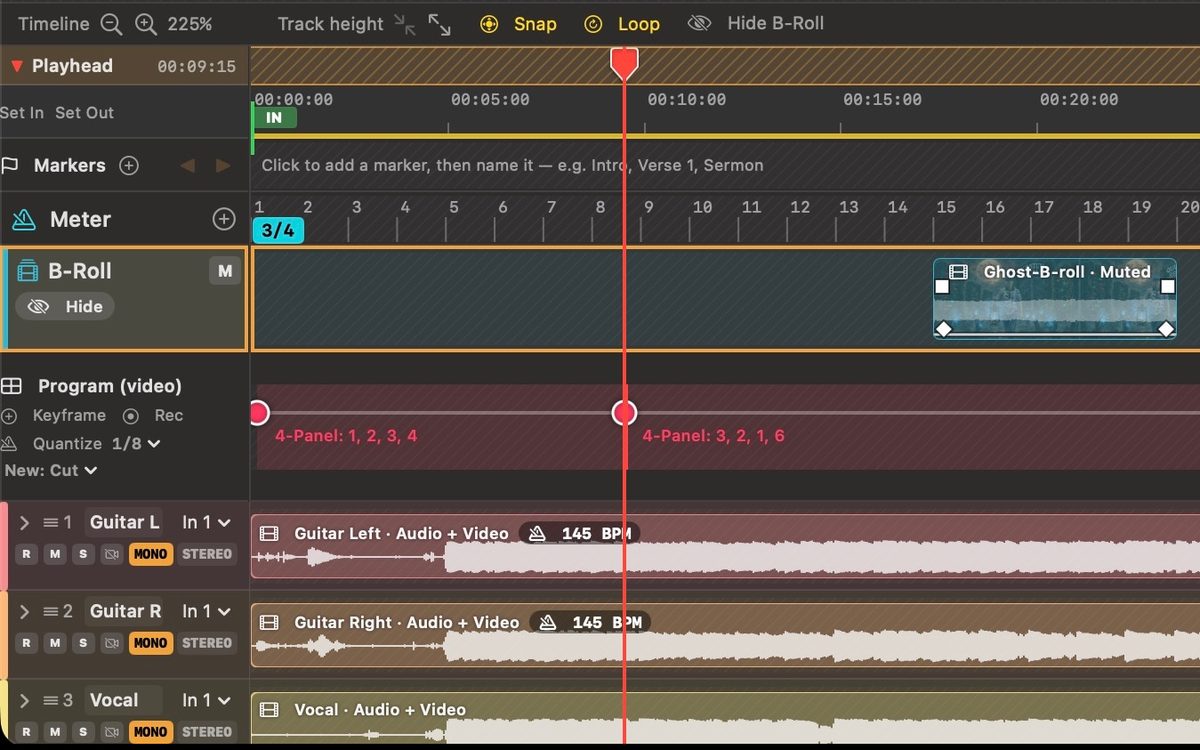
QVideo8 timeline with per-track audio and video lanes, waveforms, and program keyframes

02 Editing

Clips move as sound and picture together.

  • Move, trim, split, copy and paste clips, audio and video together. Wide trim grips.
  • Clips snap to the playhead, video keyframes, other clips' edges, and markers, on either edge. Hold ⌘ for free placement.
  • Fades, Pro Tools style: drag from outside a clip's start or end into it and press ⌘F. Or drag the fade handles at a clip's top corners.
  • Markers, In and Out points, and Loop. Loops go round seamlessly.
  • Rehearsal speed: play the song at 90%, 75%, or 50%, pitch unchanged, to learn a part. Nothing records at a rehearsal speed.
  • Smooth dragging, even in long sessions. Undo for everything.
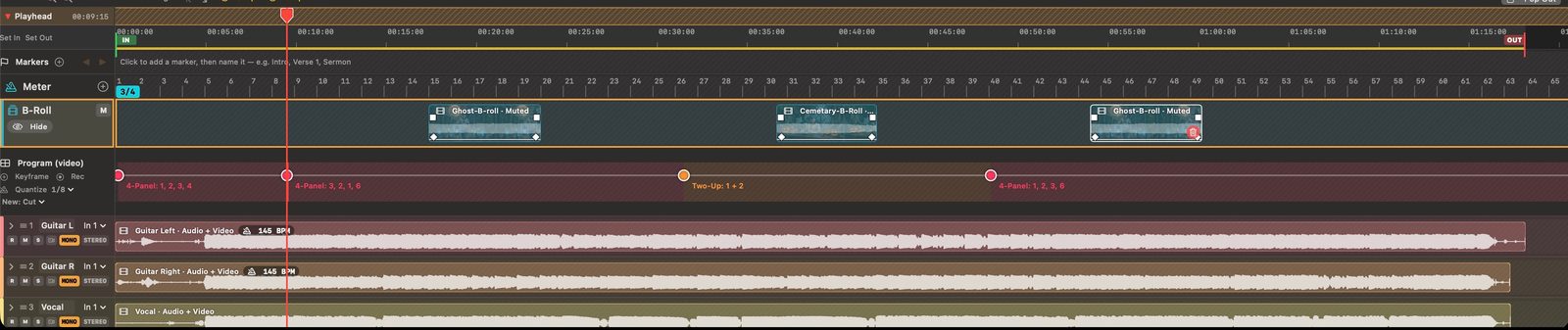
QVideo8 timeline with clip lanes, markers, and the playhead

03 Mixing

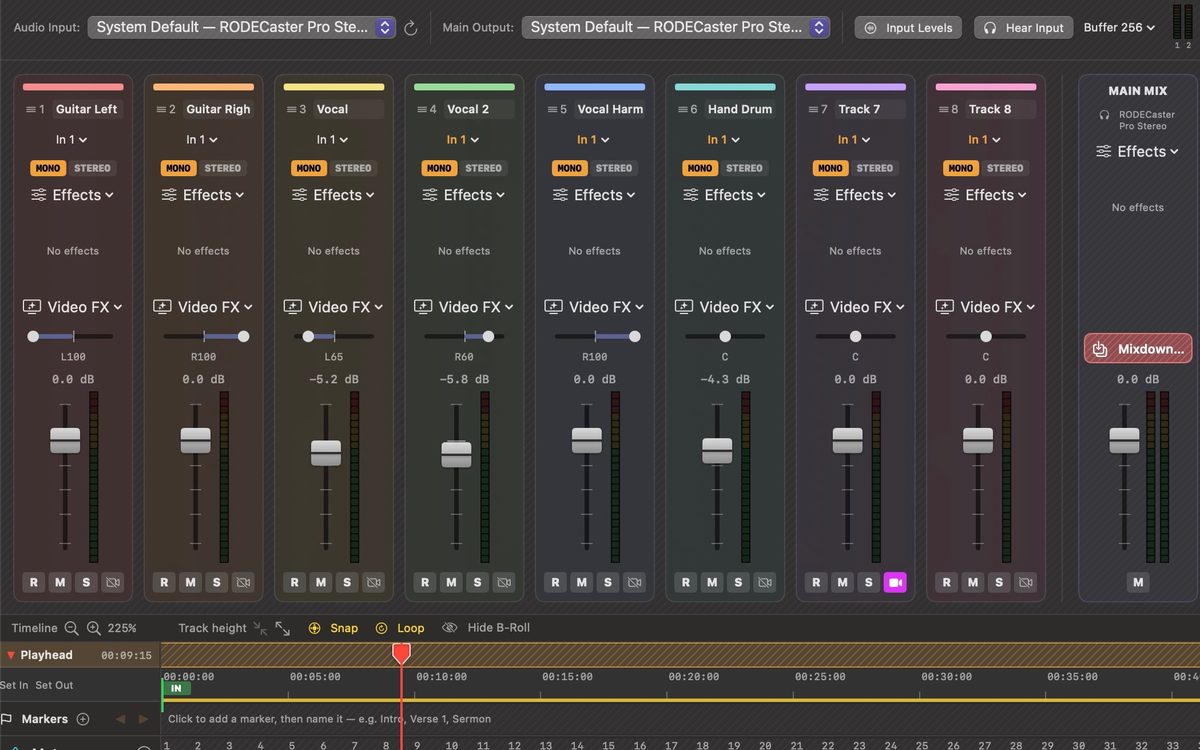
A full mixer, with room for ten tracks.

  • Faders with LED meters, pan (two pans on a stereo track), mute, solo, and a main mix with its own effects.
  • Automation for volume, pan, and mute, drawn or recorded live by moving the fader.
  • Narrow, standard, or wide mixer strips, to fit ten tracks on a laptop or spread out on a big screen.

Effects on every track. Tube Warmth is an analog tube preamp: Body, Drive, and Air. The compressor has Hard Knee and presets. Each effect has its own window, with knobs and meters, and you can type exact values.
  • Voice Isolation
  • Noise Gate
  • Tube Warmth
  • Compressor
  • De-Esser
  • 4-Band EQ
  • High-Pass Filter
  • Low-Pass Filter
  • Pitch Shift
  • Distortion
  • Chorus
  • Flanger
  • Slap Delay
  • Reverb
  • Limiter
QVideo8 mixer with Guitar Left, Guitar Right, Vocal, Vocal 2, Vocal Harm, Hand Drum, Track 7, and Track 8, faders, pan and meters

04 Video

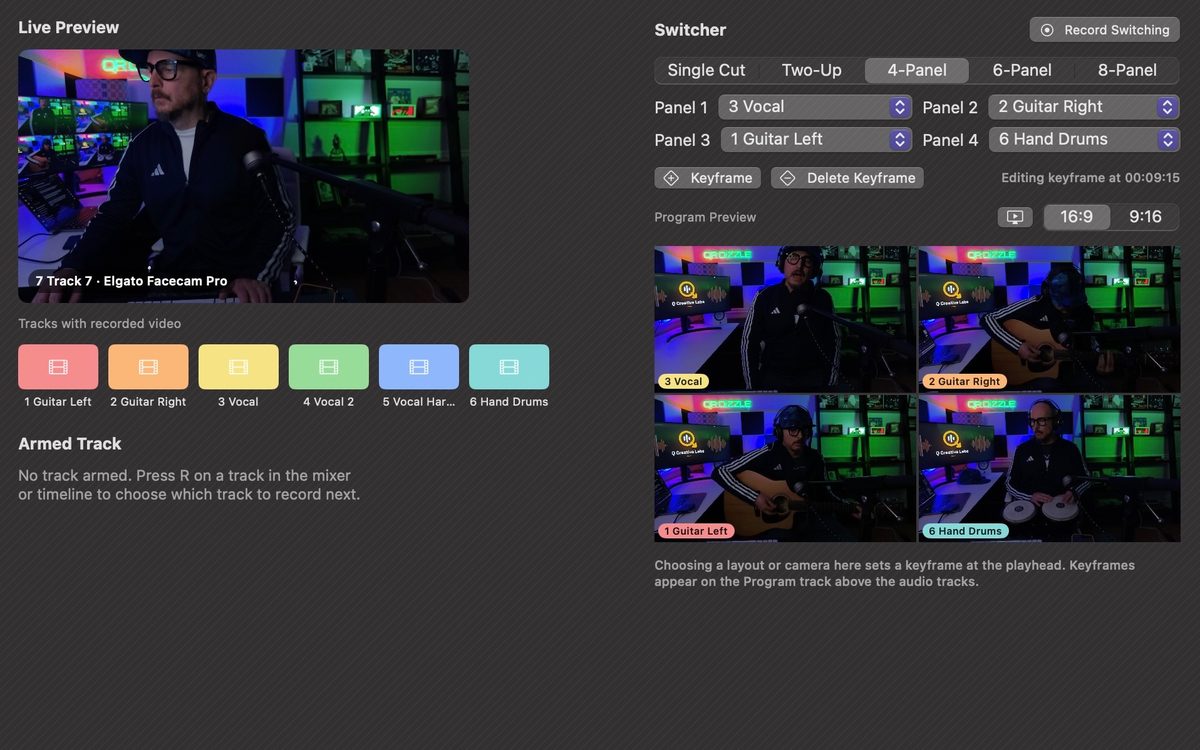
The Video MIX. Up to eight panels.

  • Switch between cameras and layouts — one camera, split screens, grids up to eight panels — as the song plays. Set it with keyframes, or record your switching live.
  • Transitions between shots: Dissolve, Dip to Black or White, and Bloom Dissolve, a bright glow.
  • B-roll cutaways: drop in movies and pictures over the performance. Trim them, fade their sound, and dissolve them in and out. Right-click for Dissolve, Bloom to White, Dip to White, or Dip to Black, at either end or both. Or select into the clip's start or end and press ⌘F.
  • Slow zoom per shot: zoom in toward a spot you pick, or out from it.
  • Video Monitor beside the mixer, in its own window, or full screen on a second display or TV (Output ▾). Hide it from the mixer when you're working on the sound.
  • Snapshots save the picture at the playhead as a PNG in Downloads. 16:9, or 9:16 vertical for social media.

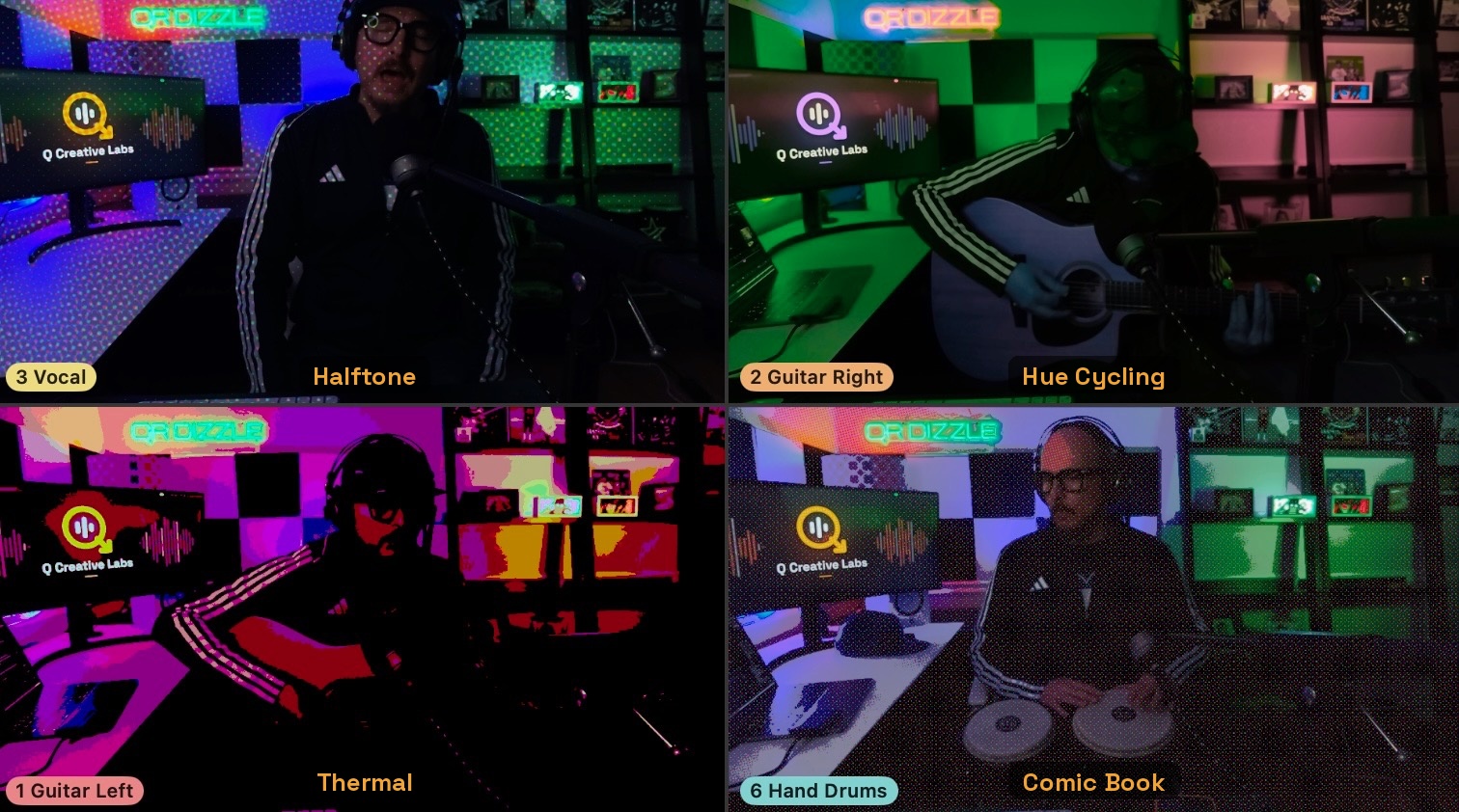
Video effects are per track, each with a Strength knob and Beat Sync, including Earthquake, which can shake on the beat, and more.
  • Comic Book
  • Thermal
  • Hue Cycling
  • Glass
  • RGB Split
  • Bloom
  • Echo Trails
  • Earthquake
QVideo8 Camera and Switcher: Live Preview and a multi-panel program preview
QVideo8 video effects on four camera panels, including Hue Cycling, Thermal, and Comic Book

05 Finishing

Mix down from In to Out.

  • Mix down to a video file in 16:9 or 9:16, or to audio only, from In to Out.
  • Free video mixdowns are 720p, with the QVideo8 logo in the corner.
  • 1080p video mixdowns Pro
  • No QVideo8 logo Pro
  • Audio-only mixdowns are full quality for everyone.

06 Made for real sessions

Long sessions stay light.

  • Long sessions use memory sparingly, and playback starts at once.
  • Only the devices you have are shown.
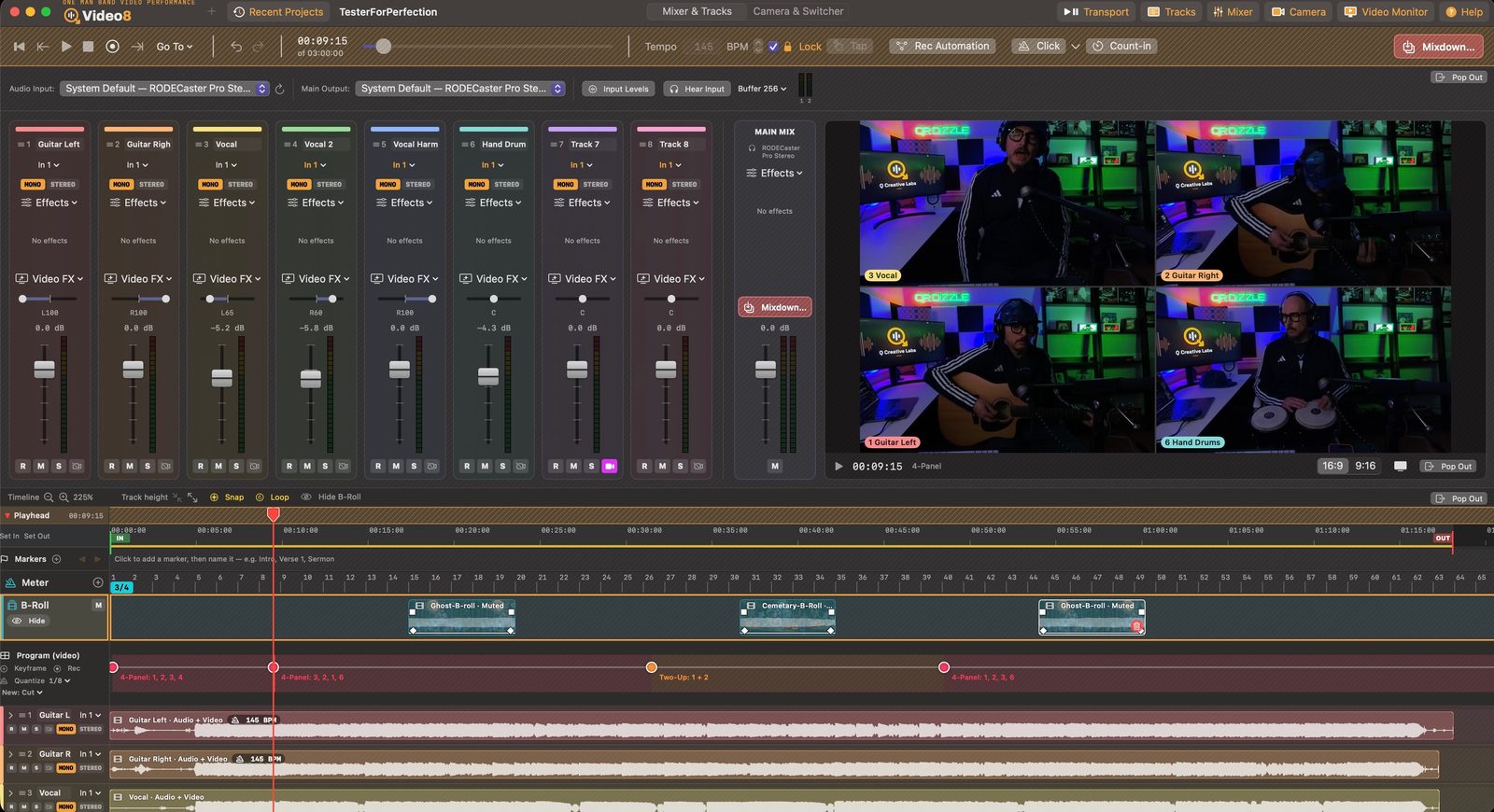
QVideo8 session with the mixer, video monitor, and timeline

Pricing

Free, or Pro.

Every recording, editing, and mixing feature is free. QVideo8 Pro, yearly or lifetime, is 1080p with no logo. On the Mac App Store.

Free

$0

No purchase

  • Every recording, editing, and mixing feature
  • Video mixdowns at 720p with the QVideo8 logo in the corner
  • Audio-only mixdowns at full quality

Pro

$39.99 a year

or $99.99 lifetime

  • 1080p video mixdowns
  • No QVideo8 logo

Requirements

What you need.

Mac
Apple silicon (M-series)
macOS
15 Sequoia or later
Camera
The Mac's camera, a USB webcam, or an iPhone as a wireless camera via Continuity Camera
Audio
Any audio interface or USB mixer, any input on any track
Recommended
Headphones
Price
Free, or QVideo8 Pro. Pro is $39.99 a year or $99.99 lifetime on the Mac App Store. Free video mixdowns are 720p with the QVideo8 logo in the corner. Pro is 1080p, with no logo.

FAQ

Free and Pro.

What can I do for free?

Everything. Record, edit, and mix with every feature. Video mixdowns are 720p, with the QVideo8 logo in the corner.

What happens if my subscription ends?

Mixdowns go back to 720p with the QVideo8 logo in the corner. Projects and recordings are never affected.

Do I need Pro for audio?

No. Audio-only mixdowns are full quality for everyone.

QVideo8 launches January 12, 2027.

The free beta is open through Nov 23. Join in 3 steps. This form is for the January 12, 2027 launch. Every recording, editing, and mixing feature is free. Video mixdowns are 720p with the QVideo8 logo in the corner. QVideo8 Pro is 1080p with no logo: $39.99 a year, or $99.99 lifetime, on the Mac App Store. Leave your email and we'll tell you when it launches.

We'll only email you about the launch.

Built With You

If QVideo8 earns a place in how you work, tell me what you wish it could do. Suggest a feature.